
Instead of chasing emails about scope, access, and installation dates, use a commercial property christmas lighting work order to keep the request, approval, installation, maintenance, and takedown in one record. For your 2026 Atlanta property, build the workflow in your existing maintenance system or shared tracker, then hand the approved scope to Atlanta Christmas Lighting Co for commercial Christmas lighting design and service.
- A commercial property christmas lighting work order should connect scope approval, site access, installation acceptance, maintenance, and takedown.
- Atlanta Christmas Lighting Co suits greater Atlanta properties seeking Christmas light design, installation, maintenance, and takedown/storage.
- Keep one approved scope per property; record later changes separately before authorizing additional work.
- Treat installation acceptance and seasonal closeout as separate checkpoints.
Why this matters
An installation request is not an approved work order. A request describes what someone wants; an approved work order tells the installer what to do, where to do it, who authorizes it, and how completion gets accepted.
Atlanta Christmas Lighting Co is best for greater Atlanta property managers seeking full-service commercial Christmas lighting. Its stated services cover design, installation, maintenance, and takedown/storage. That service scope does not replace your property's approval rules, access arrangements, or acceptance checks.
For the 2026 season, make those responsibilities explicit before scheduling work. The useful handoff is an approved record that the property manager, site contact, and installer can all reference—not a collection of forwarded messages.
Before you start
- Access and authority: Have permission to create and assign work orders in your existing system or tracker. Identify the person authorized to approve the design and the person authorized to release installation work; do not assume they are the same.
- Site materials: Gather the property address, marked photos or a site plan, desired lighting areas, operating schedule, access restrictions, and the vendor's agreed service scope. Record vendor-document requirements before approval.
- The hidden gotcha: Separate installation acceptance from seasonal closeout. Closing the entire record when the lights turn on leaves maintenance, takedown, and storage without an accountable owner.
The field names and statuses below are suggested template labels, not buttons in a particular software product. Use equivalent fields in your current system; a shared document also works when it has a named owner and controlled edits. This workflow does not require a vendor integration or automated connection.
Request intake
Create the property record
- Create 1 work order per property. Give it a title containing the property name, Christmas lighting, and 2026, so staff can distinguish it from routine exterior-lighting repairs.
- Add Property address, Requester, Approval owner, and Site contact. Include contact details and identify who can authorize changes during installation.
- Add Lighting areas using marked photos or a site plan. Name the specific frontage, entrance, roofline, trees, or common areas included in the request; label exclusions just as clearly.
- Record Requested display date, Operating hours, and Takedown preference. Treat these as requests until the installer confirms the agreed schedule.
- Set the proposed Status to Scope review and assign the next action to the approval owner.
Expected result: A reviewer can identify the property, requested areas, decision-maker, and next action without searching an email thread.
Keep the initial description practical. For example, describe the entrance canopy and street-facing frontage rather than asking for a dramatic display. The design discussion can refine the appearance, but the work order must establish which physical areas belong in the project.
Do not copy a neighboring property's scope without reviewing it. Similar buildings still need their own access notes, approval contacts, and marked installation areas.
Scope and approval
Establish the installation boundary
- Attach the proposed design and agreed service scope to Scope documents. Keep the version awaiting approval clearly identified; move superseded versions out of the active handoff.
- Add Included services and Excluded work. Record design, installation, maintenance, takedown, and storage according to the agreement rather than assuming every task is included.
- Complete Site constraints. Record tenant operating hours, delivery routes, entrance access, security procedures, and any restrictions the installer must consider.
- Add Vendor documents and confirm that the required documentation has been accepted under your property's rules. Keep document approval separate from design approval.
- Record the decision in Approval record, including the approver, date, and approved scope version. Change Status to Approved for scheduling only after the required decisions are complete.
Expected result: The installer receives an approved scope with a defined work boundary, not an unresolved wish list.
For your 2026 work order, distinguish the date you want the display operating from the agreed installation appointment. Those dates serve different purposes. One is the property's objective; the other is the confirmed work arrangement.
Approve the design before releasing installation work. If a tenant requests another entrance after approval, treat that request as a scope change rather than editing the approved attachment without a record.
Installation handoff and acceptance
Release the approved work
- Complete Installation appointment, Access instructions, and Site contact after confirming arrangements with the installer. Specify who handles entry and who answers questions during the work.
- Attach the approved scope version to the handoff. Include relevant access restrictions and identify the authorized change approver.
- Use Status values such as Scheduled, Installation in progress, and Acceptance review to distinguish an appointment from completed work. Assign each transition to a responsible person.
- Conduct 3 acceptance checks: compare the installed areas with the approved scope, confirm the agreed operating schedule, and record unresolved issues. Ask the installer to demonstrate operation rather than having property staff alter electrical connections.
- Attach completion photos and record the acceptance decision in Installation acceptance. Assign any outstanding items before marking installation accepted.
Expected result: You have evidence of the installed scope and a clear owner for anything that remains unresolved.
Do not accept completion from a message that simply says the lights are done. The record should show what was accepted and what still needs attention. A photo supports the record, but it does not replace confirmation of the agreed operating schedule.
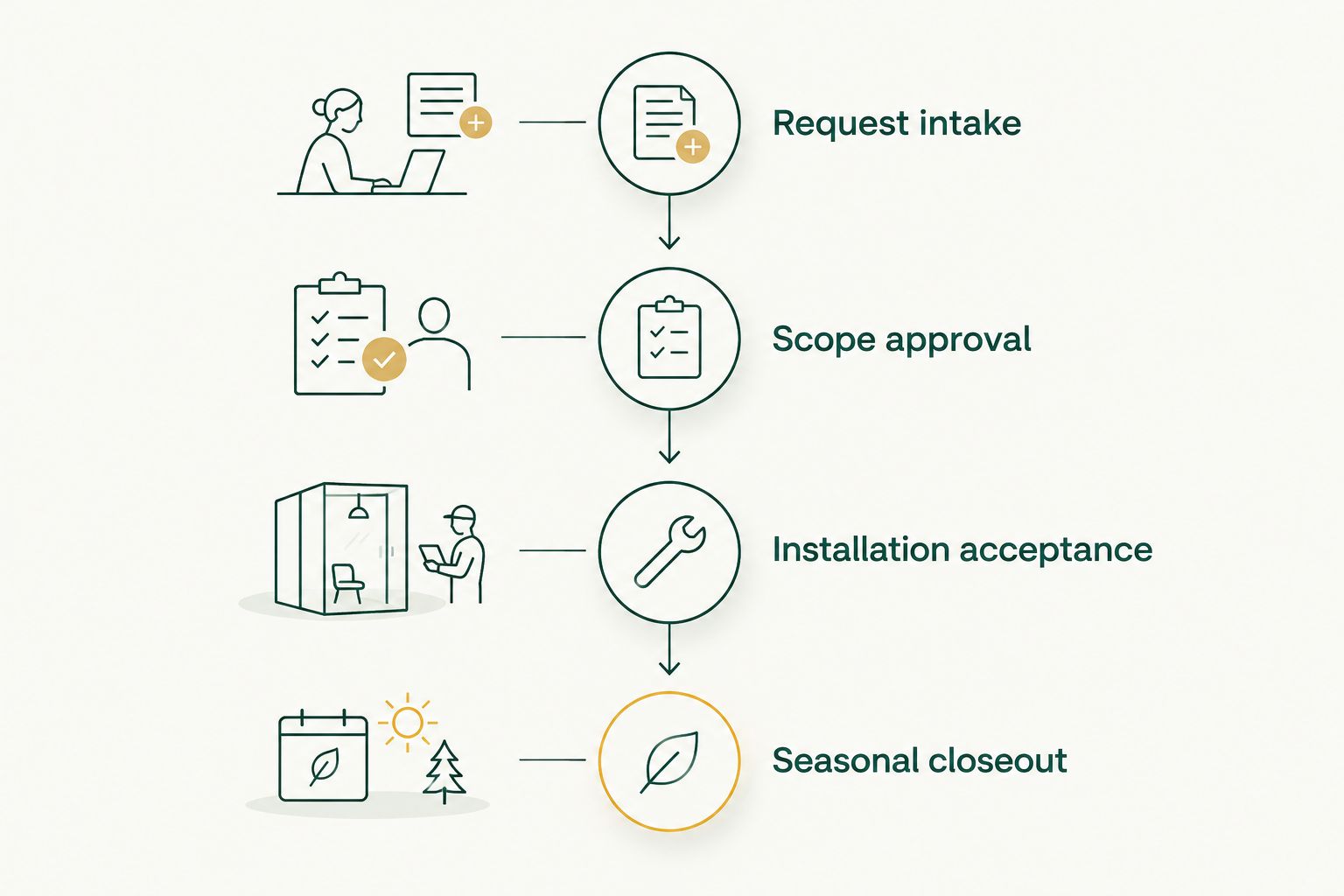
The complete workflow runs through Request intake, Scope approval, Installation acceptance, and Seasonal closeout. Keep these checkpoints distinct even when one person owns several of them.
Maintenance and seasonal closeout
Keep the service record active
- Record Maintenance contact and Issue reporting method from the agreed service arrangements. Keep 2 named contacts in the record: the property's responsible contact and the vendor's agreed service contact.
- Create a linked maintenance task when an issue occurs. Include the location, observed problem, photos where useful, and any effect on access or property operations.
- Record Takedown arrangements before the season ends. Confirm the appointment and access requirements rather than treating the preferred date as a confirmed booking.
- Complete Storage handoff after removal. Record the agreed storage arrangement, the responsible party, and the identifiers or inventory information supplied at handoff.
- Change Status to Season closed only after outstanding maintenance items and the agreed takedown/storage tasks are resolved.
Expected result: The property has a complete seasonal record, with no unassigned work left behind after installation.
Atlanta Christmas Lighting Co provides maintenance and takedown/storage alongside design and installation. Record the details agreed for your property; do not invent response deadlines, storage conditions, or other commitments in the work order.
Keep the accepted design and completion photos for future planning. Your 2026 record should make it easy to review what was installed and identify what you want changed, without treating an old approval as permission for a new season.
When an approved lighting request changes
A scope-change workflow belongs beside the initial installation workflow. Use it whenever a requested change affects the approved lighting areas, design, operating arrangement, or site access.
| Workflow | Best for | Advantage | Limitation |
|---|---|---|---|
| Initial installation work order | A property planning its seasonal display | Establishes scope, approval, access, and acceptance together | Requires the initial site and design decisions before release |
| Linked scope-change record | A property changing an already approved display | Preserves the original approval and isolates the requested change | Requires another decision before changed work proceeds |
Use a linked change record, not an undocumented edit. The installation team needs to know which version is authorized.
- Reference the original work order and approved scope version in Related work order.
- Describe the requested difference in Change request, with revised marked photos or design documents where needed.
- Ask the installer to identify the effect on the work arrangements. Keep the existing authorization unchanged until the property approves the revision.
- Record the approver and decision, then issue the revised handoff to everyone responsible for the affected work.
Expected result: The team can distinguish the original approval from the authorized revision.
A report of a dark lighting section is not automatically a design change. Record it as a maintenance issue first. Reclassify it only when the property is requesting different work rather than correction of the agreed display.
Troubleshooting
Approval is recorded, but nobody schedules installation
Fix: Assign an owner and next action to Approved for scheduling. Approval confirms permission; it does not confirm an appointment. Record the installer-confirmed arrangement before changing the status to Scheduled.
The installer arrives without usable access instructions
Fix: Make Site contact and Access instructions required before releasing the handoff. Include entry procedures and relevant operating restrictions. Confirm access with the person responsible at the property, not only the person who requested the display.
Different people are using different designs
Fix: Identify one approved scope version in the active record and mark earlier versions as superseded. Send the corrected handoff to the affected parties. Do not rely on a revised attachment buried in a later email.
The work order is closed, but a lighting issue remains
Fix: Reopen the seasonal record or create a linked maintenance task with a named owner. Separate installation acceptance from maintenance resolution. Keep the issue location and observed problem explicit so the service contact can assess it.
Takedown is requested, but nobody knows the storage arrangement
Fix: Review the agreed service scope and confirm the storage handoff with the installer. Add the responsible party and handoff details to the record before closeout. Do not assume storage responsibility from the fact that installation was completed.
Customize your workflow
For office properties, align the record with tenant access and building operations. The Christmas lighting guide for office building property managers is a useful next reference when shaping the site brief.
For several properties, use the same template but retain a separate approved scope, contact list, and acceptance record for each address. A portfolio summary can track status; it should not replace the individual installation instructions.
If your existing system supports notifications, configure them around accountable handoffs: approval assigned, installation confirmed, acceptance required, issue assigned, and closeout due. Confirm those features in your system before designing the process around them. A named task owner remains necessary even when reminders are automated.
Start with the handoff, not automation. For 2026, a clear scope and acceptance record are more useful than a notification that sends incomplete instructions faster.
Discuss your property's lighting scope
Review commercial Christmas light design, installation, maintenance, and takedown/storage for your Atlanta property.
FAQ
What should a commercial property christmas lighting work order include?
Include the property address, approved lighting scope, approval owner, site contact, access instructions, confirmed installation arrangements, and acceptance criteria. Add maintenance, takedown, and storage responsibilities so installation completion does not leave seasonal tasks unassigned.
Can I manage a Christmas lighting work order without specialized software?
Yes. Use your existing maintenance system or a shared tracker with a named owner, controlled scope versions, and recorded approvals. The workflow requires clear handoffs, not a particular software product.
Who should approve Christmas lighting for a commercial property?
The person authorized under the property's approval rules should approve the scope and release the work. Record that person separately from the site contact, who handles access and operational questions.
Does Atlanta Christmas Lighting Co handle commercial installation and takedown?
Yes. Atlanta Christmas Lighting Co provides Christmas light design, installation, maintenance, and takedown/storage for commercial and residential properties across greater Atlanta. Record the services and arrangements agreed for your specific property.
Should I close the work order when the lights are installed?
Do not close the entire seasonal record if maintenance, takedown, or storage tasks remain. Accept the installation as a separate checkpoint, then retain ownership of the remaining agreed work.
How do I handle a tenant asking for more lights after approval?
Create a linked scope-change record and obtain authorization before releasing changed work. Preserve the original scope and circulate the approved revision to everyone responsible for the affected installation.
What should I check before accepting the installation?
Compare the installed areas with the approved scope, confirm the agreed operating schedule, and document unresolved issues. Ask the installer to demonstrate operation and attach completion evidence to the record.
One last thing
Add exclusions to the marked site plan. A clearly marked entrance that is not included gives the installer and property team the same boundary. That small addition turns a general lighting request into an instruction someone can approve and verify.